Eligible to Register
Institutions can now gather data relating to students who are eligible to register, but who have yet to register for a specific upcoming academic term or session.
Additional Student Retention Workflow options have been added to facilitate identifying and tagging students for a variety of follow-up reasons.
Using the General Student Info reporting page, you can identify, based on institutional rules established in the Configuration Settings, students who are currently registered and students who are eligible to register, but who are not currently registered.
To access the foundation report: Student Info -> General Info
Run the report for a current, past or future Term and include any additional Filter Options.
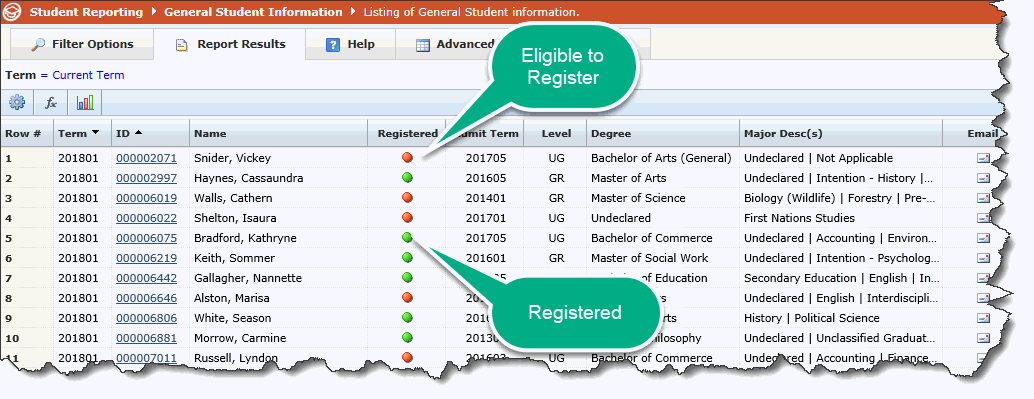
On the executed report, you will see a column of "Registered".
GREEN: If the Registered indicator is green, the student is currently registered in the selected term. Drilling down on the indicator will take you to the list of courses the student is currently registered in.
RED: If the Registered indicator is red, the student is not registered in the selected term, but is eligible to register, based on your institution's eligibility rules.
Set-up Rules for Eligibility:
Using the FAST Student Reporting Configuration Settings, the following settings need to be established in order to correctly identify students at your institution who are Eligible to Register:
420: Eligible to Register - Number of Stop Out Days Allowed. Default = 365
425: Student Info - How many days beyond current term do you want? Default = 365
428: Student Info - How many days prior to current term do you want all eligible records? Default = 0
Once these Configuration Settings are confirmed and/or edited, your end users can begin using the Eligibility indicator as intended.